Showing posts with label increasing traffic. Show all posts

Thursday, January 26, 2012

Savvy Enterepreneur: Using StumbleUpon to Drive Traffic

I’ve recently become convinced that StumbleUpon can really help drive traffic to your website if you use it somewhat regularly. I’ve been spending some time playing around and reading tips on the best way to utilize it and being the generous geek that I am I thought I’d share a few tips for those of you totally new to it all.

StumbleUpon is often described as a bookmarking site, but in my opinion it works much better as a discovery vehicle and a traffic source. It is a social network, so this means you need to interact and yes follow, not just promote. However it takes much less diligence than Facebook and Twitter to start seeing results.

Getting Started

First things first, set up an account, fill in your profile and interests and start following people - your friends, people you interact with on Twitter and Facebook, bloggers you read, etc. I also highly recommend downloading the toolbar for your browser it will make things much easier.

Once you’ve got your profile all set and are following a few people, start stumbling. This means letting StumbleUpon suggest websites, images, and video based on your interests and what the people you follow like. This is the discovery part. You will undoubtedly find some new things that interest your, articles worth reading, and just generally entertaining stuff.  The more you use it and rate things, the more you’ll find things that actually interest you.

A web page only gets into the system if a user likes it. The more a page gets liked the more it gets shown to other users. If a page gets disliked or no response it will eventually drop out of the system.

Distinguishing Yourself

If you are a helpful user you make the system better and people will take a look at what you recommend. It’s really that simple. So every time you find something on the web you appreciate, like it via your stumble bar. It’s also helpful to write a quick review and/or add tags. This will not only help you find the things you liked again, but will help other users get what they’re looking for.

Make sure to define your interests, not only will this help you find the types of things you’re looking for it will also help you establish yourself as a source for information around that topic.

Also join groups, search out new users and interact. It is a community and the more you give the more you get back.

Generating Traffic

First a word of caution, just liking your own pages can get you removed from the site and it’s simply not being a helpful user. However you certainly can like your pages, especially new blog posts, give them a quick review and get them into the system.

If you submit something new you’ll get a window that pops up congratulating you on a new discovery, take the time to fill in the tags and review, it will help your content get seen by those who are truly interested in it.

The thing about StumbleUpon is that while you can suddenly get 1,000s of new eyes on your website, most of the traffic jumps off just as quickly. So you must still have great content, striking images, or useful videos. Content that has the potential to go viral is great to submit and also helps pull users further into your website.

So take some time each week to use StumbleUpon to find new things, explore the community and submit one or two of your own pages. You will get little boosts in traffic and if your content is useful and engaging they will come back and they will share.

Now go stumble and by all means follow me!


I encourage comments directly to this post, but also feel free to email me directly with questions, reactions, struggles, etc. genevieve [at] lightboxsf [dot] com


If you're an Etsy seller in the San Francisco Bay Area, contact Jen from Mama's Magic Studio about joining SFEtsy!

Thursday, March 31, 2011

SEO for Crafters - Part 2

In part 2 of SEO for Crafters I’ll show you what you can do with those keywords you’ve spent so much time researching.

How many keywords did you come up with? It’s honestly only reasonable to be able to optimize for 5-10 words or phrases. But don’t worry if you came up with a list of 50 or more, your work wasn’t in vain. If the words and phrases on your list are related you can pull from them now and again to keep things fresh. You may also decide to optimize specific pages for different words.

To optimize your website or blog for a word or phrase means to use it in key places that allow search engines to find that word on your site. You probably have a friend who uses the same expression over and over again like “cool beans,” or “totally, man.” When you hear that expression you can’t help but think of them. Optimizing has a similar effect. You will strategically use words and phrases repeatedly in your text and titles. The more you do this the more search engines will associate your website with those words. The search engines are looking in five main areas: titles, descriptions, main copy, links, and urls, to find those keywords.

Titles and Descriptions

Search engines place higher importance on words that are formatted as headings and titles, so use your keywords in titles and headings for your pages. To have the full impact you can’t just bold the text or make it bigger you need to format it as a heading or title.

If you use a platform for your website that does behind the scenes coding for you, you probably have optional fields for descriptions, both for pages and posts. I recommend filling them in. The descriptions should read like normal text as they will be seen on the search page below the link to your site. If you have a compelling, to-the-point description it will help entice people to choose your link over others.

Main Copy

The main text of your website is also ranked, but not as high as titles. First and foremost use natural language, you want people to be engaged with your text so they read it all, come back for more and even share it. But do keep that list of keywords in mind and pepper the words you’re focusing on throughout the text. This may mean that your website in general is optimized for one phrase while specific articles are optimized for different, but related phrases.

Links

Links are important for many reasons, but in this context you want to link specific words in your main text to a related article on another website. So from this point on no more “click here”, instead use keywords to describe what you’re linking to. For example at the bottom of this post there’s a link to a cheat sheet for all this keyword information, I use the words, “using keywords in SEO” as a link not “illustrated cheat sheet” because they’re more specific and descriptive.

URL

You should have control over the urls for your pages and individual posts. Make use of keywords here too. Don’t ever settle for the default random number that’s generated with some blogging platforms. If your platform generates a url from your title that’s great because you’re already using keywords, however you might want to tweak it to either make it shorter or really focus on the right words.

All of this boils down to is having a few words or phrases that are descriptive of what your website is about and using them in a natural, organic way in the titles and text of your site.

To help you with this week’s tips here’s an illustrated cheat sheet for using keywords in SEO.

Next week we’ll focus on authority, the final part to SEO for Crafters.


I encourage comments directly to this post, but also feel free to email me directly with questions, reactions, struggles, etc. genevieve@lightboxsf.com
If you're an Etsy seller in the San Francisco Bay Area, contact Jen from Mama's Magic Studio about joining SFEtsy!

Thursday, March 24, 2011

SEO for Crafters - Part 1

This is the start of a little series I’m going to call SEO (Search Engine Optimization) for Crafters. I’m going to break it down into the simplest pieces I can.

This series is for those of you who have only just heard of the term SEO, either here or in passing conversation, but really have no idea what I’m talking about or why you should care. Don’t worry I’ll be sure to let you know why you should care.

There’s a lot of mystery surrounding SEO. This is because it’s as much art as it is science and it takes time to see results. Many people actually do the right things, but give up before the magic takes hold.

What I intend to do is give you a few simple steps that can help you give your website or blog a big boost. You will need to be patient because it won’t happen over night. But if you’re able to keep in mind a few simple things, you will see results.

So let’s jump right in and talk about target market and keywords, the building blocks of SEO. But first let me explain search engine optimization. It is more or less exactly what it sounds like, optimizing your blog or website so that search engines will find you easily when a search is performed. The better your site is optimized the higher up or closer to number 1 in the search you appear and the more likely someone will be to click the link to your page.

Target Market

Here comes that target market thing again. For you to optimize your blog or website you need to define who you want to reach and what they’re searching for. The more you can narrow the focus of your blog and who will be interested the better your chances of rising to the top.

This means you need to think like your customers, what words would they use to find you? What specifically are they searching for?

Start Thinking About Keywords

Keywords are the specific words that someone would use in a search if they were looking for the information on your website or blog. When someone performs a search it’s because they have an interest. They tend to type in 2-3 words that first come to mind to describe their interest. They find a few interesting links that either a) give them a new phrase to search for or b) make them add on words to refine their search. When they start their search they get a lot of information they don’t want, but by following a few links they eventually find the wording that will lead them to the link they want.

What might those words be? This is the trick to keywords.

Google Adwords

Google Adwords is a pretty powerful tool that will give you a lot of useful information. You need to pick a word or phrase to start with, but this will most likely lead you down a path, so give yourself time to explore, be open to words and phrases you hadn’t thought of and take notes.

When you type in a word or phrase you get a list of related search terms with numbers listed for “Global Monthly Searches” and “Local Monthly Searches” as well as a bar graph that indicates competition. The monthly search numbers tell me how many times someone used that phrase over the last month both globally and locally (which is only as specific as United States). You’ll see numbers in the hundreds and in the hundred’s of thousands. Obviously the higher the number the more people are looking for that “thing” in particular. However the highest isn’t always the best. This is where the competition comes in.

Competition is a little tricky though because what it actually refers to is the number of businesses buying that phrase for their adwords campaign. However, it’s also a good indication of websites that have been optimized for that word or phrase. What you’re looking for is a combination of low to medium competition and medium to high search numbers

Look To Your Competition

Google Adwords also allows you to search a competitor’s website to see what words they’re optimized for. This will not only spark a new direction in thinking, but can help you distinguish yourself.

At the end of all this back and forth and chasing around you should have developed a list of 50 to 100 words and phrases that fit your business. They should either fit the low to medium competition and medium to high search numbers formula or have such ridiculously high search volume that competition doesn’t really matter.

Organic Search

Now there’s one final step, checking your organic search competition. Organic results are the websites, not the ads, that come up when you do a basic Google search. All we’re going to do now is get an idea of how many other websites are using the terms on your list. To do this type “allintitle: your keywords” into a basic Google search. What comes up is the websites that use this term in titles both of the entire site and of individual posts. There will be a number directly under the area you type your search term in. That’s how many pages use that term or phrase. If you can the results into the hundreds instead of the thousands, you’re on the right track.

Next week I’ll tell you what to do with all those keywords.

We often describe our businesses differently than others, what words do you commonly use in talking about your business? Do those match up with what others say?


I encourage comments directly to this post, but also feel free to email me directly with questions, reactions, struggles, etc. genevieve@lightboxsf.com


If you're an Etsy seller in the San Francisco Bay Area, contact Jen from Mama's Magic Studio about joining SFEtsy!

Saturday, November 27, 2010

Increase Traffic in your Etsy Shop by 500% - Using Tools to Renew Listings Wisely

When I first started on Etsy, I didn't understand why I wasn't getting a ton of people in my shop and selling out of everything. Upon reading some articles from The Storque & more from the Seller's Handbook, I realised that relisting my items (aka: renewing) was going to be the key to my success.


I decided I needed to make more of an effort. I entered into The Renewal Experiment.


I never used to relist my items until I discovered a way that didn't feel like I was shooting in the dark. It made sense to me that I would want to relist my items during the times of the day when I was getting the most traffic in my shop to increase my brand's visibility.

How did I find out when those times were? Google Analytics

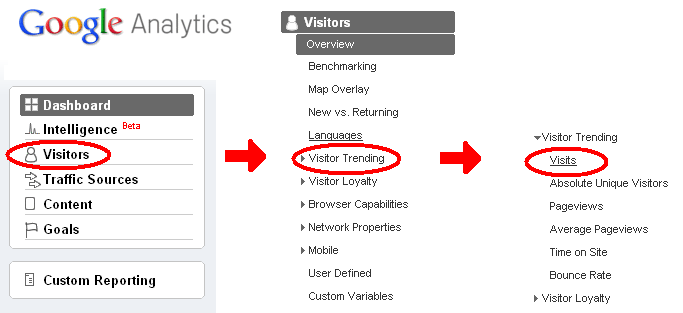
If you have Google Analytics set up for your shop, go click on the following for your Etsy page: 

  • - Visitors
  • - Visitor Trending
  • - Visits 

At this point, there should be a graph on the screen. In the upper right hand corner of the graph, there should be a section that reads "Graph by:" which is followed by 4 buttons. Click on the button that looks like a clock.


This will show the amount of visits you've had for every hour each day for the past month. 


When I first started renewing, I would renew on my top 3 hours everyday and I increased my views quite a bit. But then I started noticing my visiting times were changing. 

In the top right hand corner just above the graph, there is a date range in which you're measuring your visits for the last month. If you want to get VERY specific, you narrow your search down for the last week or so - this allows you to see what your Etsy visitors have been trending lately. 


This graph shows that 3 PM, 5 PM, 6 PM, 7 PM and 8PM are my busiest hours in the last couple of weeks. 

Now knowing what my busiest hours were, I utilized Statsy's Clockbot to AUTOMATICALLY renew my listings throughout the day at my Peak Hours. To find out more on how Statsy's Clockbot works, check out this awesome article on Handmadeology!


When I felt confident that I was seeing increased traffic & sales, I upped the stakes a little by renewing at 20 minute intervals at 6 & 7 PM, two of my highest traffic hours, using this increase in Unique Visitors to optimize my opportunity to increase my brand's visibility!

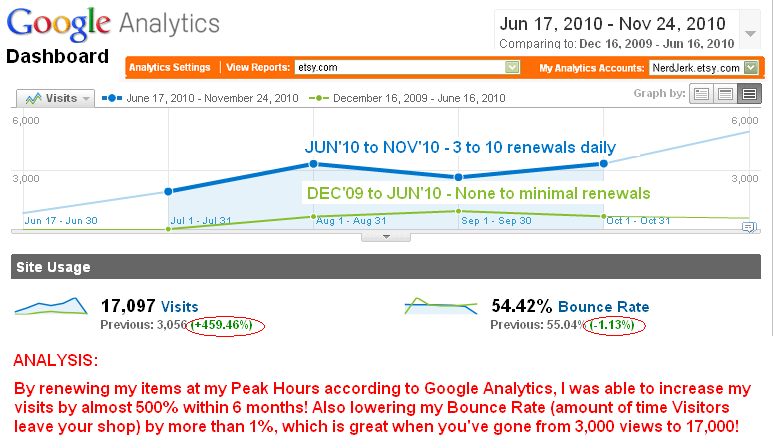
And let me tell ya - it's fricken done WONDERS! Here's a comparison graph of what my views were from Dec 16, 2009 to June 16, 2010 right along side my views from when I started my experiment on June 17, 2010 to November 24, 2010.


I used to get less than 20 unique viewers a day. When I started doing this experiment (renewing 3 times a day), I could get up to 50 unique viewers, easily, with almost 150 pageviews. 

Then I started adding Connecting Links (ie: links that would say "If you like this, you like that") to all my listings to increase click-through and decrease bounce rate for my Etsy site to see what would happen. Those Connecting Links kicked me up to about 250 page views per day! 

Now I renew 8-10 times a day only during my peak hours (or when I've had a sale) and increased Unique Viewers to a minimum of 100 and maximum average of 250 daily, with anywhere from 300 to 650 page views in that day. I loving seeing these numbers on Craftopolis! It used to a dismal sight, but now I look forward to seeing the numbers!

Sure - it seems like a ton of work (and money), but increasing my shop's visibility and going from almost nothing to feeling like I'm making informed decisions and measuring the pros-cons with quantifiable results is REALLY awesome.

And not too hard to do. 

I would ask you to try it yourselves... just a few renewals every few days and see if it makes a difference when you look at your stats on Craftopolis! 

It sure did for me!

Share some stories about how you have increased traffic for your shop or what you plan to do to get those new customers...


Read the FOLLOW-UP on how the Renewal Experiment's increased traffic translated into SALES tomorrow, Sunday, 28 November, 2010.


This post was originally posted on my blog, nerd JERK: Inspire Your Inner Geek on Wednesday, 24 November, 2010. It was also featured on Handmadeology.com and has been widely well-received. So much so that we wanted to share it with our SF Etsy members!

Steph Cortés from nerd JERK is the Roving Reporter, one of the members of the SF Etsy Blog Team. She enjoys going out to new crafting events and supporting the Handmade Movement, along with helping her fellow Etsy Sellers with tips & tricks to assist in making their business awesome. Look forward to more reports on her artsy shenanigans in weeks to come. Feel free to email her comments & tips anytime.

If you're an Etsy seller in the San Francisco Bay Area, contact Jen from Mama's Magic Studio about joining SFEtsy!
Related Posts Plugin for WordPress, Blogger...